Monday, November 09, 2009

The Last Post


This will be my four hundred and sixth post on this blog. I have really enjoyed using this as a place to explore one of my biggest passions, ICT in the Primary School. This blog has taken me places and enabled me to meet lots of fantastic people. But sadly it now has to close.

My contract in Redbridge will not be renewed therefore it is time to move on. Thank you to all you who have read, commented and chatted further about the links, videos and thoughts on here. Nicholas and I have had a great time working togther and inspiring teachers, TAs, parents and ultimately children in this borough.More recently Dawn, Alex and Dan Lea have greatly enriched this fantastic little community of practioners, who I hope will carry on to do us proud.

However I won't be offline forever. Next month I take up a new post as Online Content manager at 2Simple Software, a role I am hugely excited about.

Bye for now.

Friday, November 06, 2009

Sketchup Unit

I have very much enjoyed working with children in Years % and 6 on 3D Modelling during the last two terms. I have written up some of my ideas for using sketchup in the plan below> if you have any suggestions for improvements, do let me know. I must point out that I have stood on the shoulders of giants with this work, well Simon Haughton, who inspired me to pursue Sketchup in greater detail this year. I hope I have built on his work.

Help Videos to support the unit


Here is the draft planning: Google Sketchup Unit

Help Videos to support the unit

Monday, October 26, 2009

Dan Lea

dan

Last night, I watched the Teaching awards and I was thrilled to see Dan Lea, from Gearies Infants, receive the Next Generation learning award.

Dan is not one to shout about his work, he is too busy planning the next lesson or pondering his next creative idea and therefore many people won’t have heard of him. He is not on Twitter but he does share all his ideas and tried and tested projects on his blog.

To prove that Dan’s work is a cut above, take a look at his entry to last years Redbridge Film Awards, which was based on a project on refugees:


Dan has been an AST in Redbridge for some time and I am pleased to say he will be working with Redbridge Primary ICT to help us in NQT and Subject Leader events over the next few weeks.In preparation for these events and because I wanted to see what all the fuss was about, I went to see him teach last term.

I have to say I was quite blown away by what I saw. For one, Dan never seems to set an ICT ceiling on his learners, they have long since given up following neat QCA units or working in a one size fits all environment. What struck me about this learning environment was that there was a good deal of autonomy and choice. Children were given clear input on how to edit and customise their blogs and edit with Movie Maker, but then they worked in teams to bring their projects to completion, tutoring each other along the way.And while this went on their teacher would intervene sensitively and where necessary with questions and challenges in order to push the groups on further. I must also point out that this cross-curricular work is backed up by weekly ICT lessons from the school ICT Coordinator Val Barker, who is equally dynamic and keen to be at the forefront of new tech.

In one 90 minute session, I saw a group editing their blogs, and lets be clear the blogs here were not substitute school websites they were journals of enquiry around science and environmental themes. These seven year olds knew how to blog too, they could quite happily lead blogging workshops for adults if they were asked. The girls I talked to didn’t need any help or advice from this professional blogger thank you.

Also taking place were groups of children transferring video clips from Flip cameras to Windows Movie Maker, and then editing down their film and beginning to consider their audience.

In an area outside of the classroom a group of children had created a cardboard city called New Paris, which a customised Beebot (it had a a Flip camera taped to it) was being programmed to film a virtual tour.

I managed to film these children explaining what they were doing, along with some other pupil attempting to explain how they had been using green SMART USB wristbands. These devices, which were kindly loaned by TAG Learning, store a copy of SMART Notebook student edition and allow children to create notebooks at home, which can then be shared in school on the board.


Links


Read more about Dan on the Teaching Awards Site- click here

Get the latest from Dan’s Blog -here

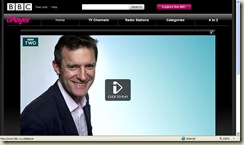
Watch the awards on Iplayer – for a limited time – click on the link

teaching awards pic iplayer

Monday, October 12, 2009

Walk to School Week and Walk with Me

I visited a school today to help them think about how they could integrate ICT into Walk to School Week. Here are are a couple of tools we looked at:

We could use the Zero Footprint Site to help children to investigate and visualise their Carbon Footprint:

carbon footprint

What this site does it to pose a series of questions about your lifestyle and the calculate your impact on the planet. You can then compare your data with the average use in your country. Note this is Canadian site but you can still look at UK figures and compare your footprint with National average.

I am not too happy with my results as it looks like i need to make some changes fast, my lifestyle is costing the earth!

earths

On the whole this is a very good sight and looks like it could really bring data handling and environment education together. You may need to explain some of the Canadian questions, like ‘Do you have a cottage?’, but this is a small issue.

The other tool that this school will be using and on a small scale is -


‘Walk with Me’, for Nintendo DS. I can not believe that no-one has done anything yet with this game. Its another one of those games/tools that Nintendo market towards 30 somethings for self improvement and yet has real appeal for Key Stage 2 use.

walk3

With Walk with Me, you carry round an activity meter for a day and then download your step to the DS at the end of the day via infa red in the device. This is like twenty first century Data-Logging. Then the software displays your steps for the day and points out how long you have been still and ho long your were on the move. The great thing about this is that the game allows you to use your Nintendo MII to show your steps and you can use energy gained during the day to play simple games, like powering light bulbs. Extra motivation is given by attributing your activity level to an animal. In the last month I was mostly described as either a galloping horse or a busy ant, which feels ok.

walk1

During the summer I got very excited about the educational potential of this tool and emailed whoever I could get hold of at Nintendo. Just think what would happened if we gave a class of 30 an activity meter and they competed against themselves and each other during Walk to School Week. However it has fallen on deaf Nintendo ears as we still await a reply.

walk2

In the meantime in the school I visited today, they’ll be using two activity meters and pitting the head teacher against another member of staff to see who makes the greatest number of steps during the week. Perhaps Consolarium will pick this one up, or have already

Blogger Labels: Walk With Me,data handling,earth,environment,Nintendo,Activity meter,steps,energy,motivation

Tuesday, October 06, 2009

Learners Y Factor

Yesterday was Day 1 one of the Handheld Learning Conference. This three day event offers some of the best formal and informal CPD and could probably teach other major ICT Conferences a thing or two. One of the best parts of the week is when children get up and share how they have been using Technology. This is the Learners Y Factor.

During the Y Factor, a number of schools take to the stage and showcase their work with handheld or other cutting edge technologies. Schools are then judged by two guests and the readings shown on a clapometer (an IPhone App which I have yet to discover).

I was privileged to be in the small room yesterday when this took place and I managed to capture just three of the schools and I include these below The first video shows Burnt Oak Junior school and their work with Ipod touch devices 

Embedded below is a video of Loughton Scratch Club, its great to see an example of this brilliant software being used and being steered by children in their computer club.

Finally I have embedded the presentation form our own Oakdale Junior and their work with games, Nintendo DS and the Wii. Yes I am bias, but this was an entertaining and articulate presentation and shows why their teacher Dawn last night won an award for her work.


Thursday, September 24, 2009

Teachmeet SUKE

 teachmeetsuke

Never let it be said that Nicholas and I don’t know how to enjoy ourselves. Last Friday we sped down the M25 and then the M20 and some other roads to Teachmeet SUKE.

nic

This was a real return to the heart of Teachmeet as I understand it , which is a few teachers meeting in a pub to talk and share. Ok, so the Hop Farm wasn’t a pub, but it was a simple rustic barn and there were probably only about 30 of us and lots of free tea. Makes a change from the last Teachmeet I went to, which took place in a tree.

In some of the larger and more impersonal Teachmeets you can be lucky to pick up any new tips or classroom applications. Whereas on this occasion, I felt I came away with a lot to share and indeed use in the classroom. Where possible I flipped (filmed) the proceedings, but it was impossible to get it all.

You could of course watch the Flashmeeting if you missed it:

Here is a round up of what I caught on Flip, though please see Mark’s blog for a more thorough run down of the night.

Mark Warner began with a talk about a great tool called, Memiary .

Memiary allows you to post your class activities online and look back at these over time. Mark suggested that teachers could create a wordle of these activities to share with pupils and parents. It also makes a great tool for reflection on targets, achievements and just memories.

I’ll let him explain this in the film below- apologies for the usual poor quality:

If you want to know more Mark has written a blog post on this some time ago.

Evans and Hughes Talked about APP and ICT and ended up giving out many copies of the sheet which Julian developed for us. One punter obviously liked this part as she commented on the Wikki

teachmeet comment

Joe Dale -

Talked about making Powerpoints engaging, interesting and interactive. I had battery failure in the middle of this,but I recoemnd you watch his Teachers TV programme which has a similar message to his talk, yet without the beard(sorry Joe)

Stephen Lockyer – Stephen talked to us about  the Japanese  Bansho technique, a different way of presenting ideas on the IWB or even the blackboard. This is worth watching and giving greater thought too, you’ll see Stephen’s efforts to evaluate and move on in his pedagogy using Bansho, while also pondering how to make this tool more interactive.

James Barrett

James gave a very interesting and entertaining presentation about some of his games and tools, that he has created and shared on his ICT Games site. I remember using the  Calmness Counter from his site in my Y6 class to settle them down.I can also remember passing on the Change Exchange to teachers on my IWB courses and getting a great response. But tonight, James showed us some brand new tools, in the clip below you’ll see some IWB  Word Bank tools a funky number line and a Key Stage 1 safe search tool.


James’s site is a vast treasure chest of resources, though its well worth familiarising yourself with all of it, particularly if you are a Key Stage 1 teacher or IWB trainer.

Danny Nicholson

Danny shared two exciting tools, first a count down clock from Class tools. This tool has a number of MP3s that you can use to accompany the descending clock, or you can upload your own track. I think I’d use this tool at tidy up time as an alternative to the class rushing round chanting “Tidy Up Time .. Tidy Up Time”. Danny also shared his use of Prezi with us, a wonderful presentation tool that allows presenters to zoom in, out and around their ideas, alongside the facility to seamlessly embed videos.


Can I just plug Mr Nicholson’s blog here, which is an essential feed to stick in your Google Reader? Danny keeps three steps ahead of what is happening in the world of whiteboards and always seems to have a new link or idea to share.

David Philips of ICT Cover Lessons showed us how to use a WII, or rather Sonic vs Mario Olympics to teach databases.Though he stressed this idea was intended for secondary, Nicholas and I thought we could see this context being used for Primary too. I am sure player data could be put into 2Calculate or 2Investigate. If nothing else I want to buy this game

And Finally here's a word from Mr Hughes on the DSI in his classroom

A huge thank you to Stephen, Danny, David, Leon and all who had involvement in the evening. An inspiring evening and well worth the scary drive home along those dark roads.

yoursign

Wednesday, September 23, 2009

More on Assessment

The group that is NEL or North East London ICT recently met to pool some ideas and resources together on the thorny issue of assessment. Both Terry Freedman and I gave a presentation on the day and his is embedded here for your viewing pleasure.


Terry gave a very interesting and pertinent series of points on the issues around assessing ICT Capability and what should be included in a toolkit for assessment.

Blogger Labels: Assessment,North East London ICT,Terry Freedman

Tuesday, September 22, 2009

Headlines and Newspapers on the IWB

As a Year 4 Teacher, I kept a tatty paper folder full of newspaper clippings. They were well trusted scraps that I deemed appropriate to use to teach news media.When these became old and torn I’d ring the local newspaper and ask for 30 copies of the latest edition.Though  I later moved onto scanning these pages in to my PC, I always hoped for an easier way.

And now for a Redbridge/Newham or Barking Teacher there is an easier way…

The Ilford Recorder have now digitised their news and past issues can be searched in order to find some relevant content. You can of course zoom in and out of these pages and use your IWB software to annotate or highlight. I gave this a go the other night on the back room SMART Board and I think the results speak for themselves. 


recorder

more recorder

Blogger Labels: Newspapers,Ilford Recorder,SMART

Tuesday, September 15, 2009

Microsoft Songsmith – Craft songs with ease

Its been a long time since I was excited about Music Software. Back in the day (well 2003) I used to create dance music with my Year3s, using Dance Ejay. I am sure these tracks sound very dated now!

skinnyboy

If I was working with a class on the old QCA ICT and Music unit now, what would I use? For kids reared on the Wii and PS2, some of our Primary software doesn’t really excite or look very credible anymore when pitted against Singster or Guitar Hero.

Well I probably would use some off the shelf games, though DJ Hero excites me more than Guitar Hero!

But I would also look at Microsoft Songsmith a free tool that oozes creative application designed by their research wing. With Songsmith children can compose their own tunes and mix in automated backing tracks.

There is great scope here to work on the Reviewing and Modifying strand of Primary ICT, as your first attempt will always need some further editing and polishing until you can finally publish your masterpiece.

And talking of publishing, you can save your work  as a WMA for further play in Audacity or choose the option to export to Windows Movie Maker, prompting you to produce your own Music Video.

I have made a very naff video to illustrate my first go with this below:


I am not the first to blog about SongSmith,

read Lord Ollie of Bray’s blog for another take on the app

and also look at the UK Innovative Teachers Network blog.

You can also read my post on another free Microsoft tool Autocollage here.

Sunday, September 13, 2009

2Assess Exclusive


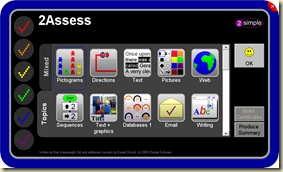
We have managed to obtain a copy of 2Assess, the new product from 2Simple. The cover image represents a bit of a departure from the familiar felt pen edge design, however it is a very original and highly collectible design.


2Assess is available very soon.


Monday, September 07, 2009

2Assess from 2Simple first look update


2assess_front_latest

Can we always say we know what our children can do in ICT? Probably not reliably and certainly not quickly. Assessment of Primary ICT has always been a headache and due to the lack of compulsory reporting or an ICT SAT test, levelling and reporting are often patchy and haphazard. At worst this amounts to nothing more than posting or pasting levels on a tracker spreadsheet, or ticking skills boxes.

There must be another way…

In the holidays I was lucky enough to have a look at the Beta for 2Assess, the new product from 2Simple. This suite of activities allows the teacher to set children tasks such as draw me a square using Logo, plot a graph for a given purpose, or create an effective spreadsheet formula for a menu or a party. Children then receive a score based on how they did, taking into account issues such as how efficient their sequence of instructions were and the time taken.

What struck me is that these activities are set in a very real context,so children work on a real database and real spreadsheets. And because they use ICT not a written test the activities are seen by children as being like games, they don’t feel like they are being assessed.

I knew one well-intentioned teacher who used to set the children a series of typed up questions following an ICT topic, they’d need to wait a while for the teacher to mark these and then she’d use a crude mark scheme to give a grade. With 2Assess, pupils and teachers would not have to wait or spend time marking they could instantly see how well the class had grasped an ICT skill and if this is coupled this with AB Tutor, Ranger, Net Opps,or some other screen sharing software, then one can bring all of the work up on screen and immediately have a discussion around what the class now know and what they need to know next.
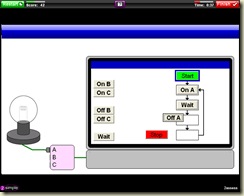
2assess_control_flash_a_light

Other tasks include responding to a series of emails,here children have to give the correct response in order to demonstrate an awareness of Esafety. The product boasts over 100 activities and they are not dependent on you having all of the 2Simple titles as the tasks measure generic skills that could be applied in a range of apps, regardless of supplier.

2assess_email_inbox_spam

As a teacher I can award certificates for children based on their progress and I can see at a a glance how well my children tackled the task set. But I need to stress that at no point are children awarded a level. I think this is very positive and I can see the intention of the team that developed the software was to see 2Assess as part of the assessment process, but not the whole answer, teachers need to be fully involved in the process and not see 2Assess as the one stop shop for their ICT assessment. That said there is a lot here to assist teachers in assessing, and I keep coming across new features. Look for example at the feedback in the image below:

2assess again

Above you can see one of the feedback features which allows you to generate a print out like the one above. allowing you to follow up the judgements with your own comments and those from the children. I think I’d keep a file of these to assist me in using APP or to just inform my planning week to week.


A further thought on levelling is to say that at a time when we are experiencing curriculum review, it would be unhelpful to number crunch the results into a crude level, as this could change in the coming months anyway.

To me the application would be a very valuable part of a Primary ICT toolkit, but it would sit next to my APP document or level descriptors and would operate alongside teacher questioning and pupil interviews, in order for me to build up a full picture and level.

For example, if we look at AF1 Planning, developing and evaluating:

Across a range of contexts pupils:

    · Plan how they will use ICT to solve a problem

    · Comment on success of their solution

    · Refine and develop information using ICT tools and techniques to make changes

    · Describe how they use ICT at school and how it is used outside school

Though 2Assess will help with analysing skills here, it should be clear that there is an implication that children need the opportunity to talk about their work and how they might have initially planned and then improved it.

2assess_database_black_hair

I am quite excited about using 2Assess at the beginning or conclusion of a lesson as a sort of electronic formative assessment. With it, I can find out whether my children can for example remember how to query a Database, it goes without saying that good teachers will then use the evidence from the assessments to address misconceptions and plug the gaps in children's knowledge and ICT skills set, rather than ploughing through the next lesson.

I think we now have a very useful and exciting tool to assist us in Primary ICT assessment.

__________________________________________________________


Here is what 2 Simple say about 2 Assess

Do you find it challenging, demanding or time-consuming to keep track of your pupils’ ICT skills?

Ofsted has highlighted in the recent ‘Importance of ICT’ report that ICT assessment is commonly weak and requires improvement. We’ve created something to help you.

2Assess presents a time-saving and consistent way to help you assess ICT skills across your school. It is a formative assessment tool with 100 real activities to support discrete and cross-curricular ICT. All tasks are delivered within highly visual, contextual based scenarios and pupils are guided by short video instructions facilitating independent use.

Instant feedback on activities helps teachers and pupils identify strengths and areas for development. View summaries of class results and exported spreadsheets, while pupils celebrate their achievements with certificates.

· Provides base line testing results for whole class and individual tracking.

· Supports the requirements of Element 4 of the Self Review Framework, by promoting regular assessment, the use of ICT to track progress and opportunities for self-assessment.

· Enables teachers to identify where children may need further support or more challenges and differentiate planning accordingly.

To watch a short overview video, please visit www.2simple.com/2assess/video  not live yet

Site licence -

Primary Schools: £249

Secondary Schools: £299

Primary School introductory site licence price- £199 if purchased before 15th October 2009.

Available on 30 day approval.

Friday, September 04, 2009

How is ICT Covered in your Primary school? - updated and fixed

How does your school cover the primary ICT curriculum: discretely, embedded in other subjects or a mixture?

Miles Berry has posted this poll online via Twitter - Take part and then watch as the results update below.

What a great use of Twitter


The WII in schools

#nlbigwii Even more learning tools being rolled out to North ... on Twitpic #nlbigwii Happy teachers heading back to their nursery school... on Twitpic

Just following Derek Roberton’s tweets this morning on a WII project in nurseries in North Lanarkshire. How exciting!!

Looking forward to following our own Redbridge gaming network involving Wiis over the coming year.

Follow his thoughts from the morning here

http://search.twitter.com/search?q=%23nlbigwii

Blogger Labels: Redbridge,Wiis,nurseries


Wednesday, September 02, 2009

Back to School with Activ Primary

back to school

Promethean Planet have kindly brought together a range of flipcharts, web links and a resource pack for the new term.

The resource packs are often very underused by teachers but they can save a lot of time in lesson preparation as they provide relevant

images, videos and flash applications that can be added to Promethean flipcharts. If you are a promethean school then it would be very worthwhile asking your technical support to download all of the resource packs for you and your teachers.

Click here to visit the Planet Back to School Resources

Technorati Tags:

Tuesday, September 01, 2009

Avatars -Here MII Are

Do you want to quickly and easily create a classroom display that will allow your class to showcase their creativity, individuality and all in a very familiar context?


Are you looking for a great starter for your Key Stage 2 ICT lesson?
If you are, then visit or download the Avatar Editor, a free Adobe Air application that allows user to create avatars that look and feel just like Nintendo Mii figures.


The Miis that you create are not in a format that can be animated and moved around on screen as in Wii Sports, though they can be exported as Jpeg or PNG. Choosing PNG means that you can opt for a transparent background and hence more easily integrate the figures into presentations or Notebook files.
This shows 4 avatars exported as PNG onto a PowerPoint slide with a blue background.

Thursday, August 13, 2009

Advice for New Primary ICT Subject Leaders

In the midst of my Autumn term course planning, I am once again looking to my learning network to give me some advice that I can pass on to those who are new at leading Primary ICT.

In my own experience I was a PE Coordinator (hahah), and later Humanities Coordinator before taking on the role of ICT in my last school. I can honestly say it was (and is still) the best job you can do, second only to teaching 30 eager children each day. It is a subject that never sits still, (unlike the ICT National curriculum).

It is also one where you are constantly  learning and pass on your knowledge to others. Though of course you could just turn into this geeky, aloof, leave me alone… go and ask the technician when they come in on Thursday type, but those coordinators don’t exist do they?

Anyway for an up and coming course for new Subject Leaders I have approached two local patriarchs of ICT to give their top tips. I hope you find them useful.

Terry Freedman


Dave Smith

If you have any other advice for those new to the role – do comment in the usual way.I suppose I need to rise to the challenge and record a video myself, but that’ll have to wait a few weeks.

Blogger Labels: Subject Leaders,Advice,Leaders,Coordinator,tips

Shape Collage

I have come across this tool before, but its recently been updated. Shape Collage is a small app that once downloaded allows you to merge a set of images into a heart, circle or rectangle.

Well that is  what I remember it did anyway, it has developed a bit since then. Now you can also customise the collage shape that the pictures merge into, this could be anything from a tree to an imported school logo or map of the borough. Also you are now able to pull in pictures from urls, though not Facebook.

In the examples below I have created 4 different collages, the final one I hope you recognise as a tree.

In the classroom this could be used as a way to display images from a residential or field trip or as a way of presenting images from across the school year. I think I would also use Flickr creative commons images or/ and my own pictures to create a collage of images to illustrate or inspire a poem. Of course this could be replicated with real images and pritt stick in Art and then compared with the on-screen version.

test4 test test2 test3

Blogger Labels: Shape,Collage,tool,images,heart,rectangle,pictures,tree,logo,borough,Also,Facebook,Flickr,poem,version,examples,collages

Wednesday, August 12, 2009

Netbooks and Scratch in PC Pro

Visit your local Tescos and in amongst the racks of Computer Active, Web User and Wired magazine is this months PC Pro magazine.


The title: Give your Kids the IT edge caught my eye, as did the review of 20 netbooks.


I recommend picking this up for a holiday read as it gives a very different overview of what children could achieve at different Key Stages and some simple walk throughs. For this read blogging at Key Stage 1 and Scratch at Key Stage 2. It is great to see Scratch endorsed for Key Stage 2 in this way and the walk through should give less experienced teachers a good starting point for working with this interface.

The Netbook megatest is very good, though no mention of the Fizzbook. Also handy is a review of handheld HD Video cameras.

Tuesday, August 11, 2009

SMART Maths Beta

SMART Board Maths Beta 3


I have been having a play with the latest update from SMART - Maths Beta


Before I elaborate further let me point out a couple of things, first this is just a BETA, you can download and play with this, but it will expire in the middle of Autumn term October 1st. After that you will need to pay for it. Also this is not an addition to the Notebook gallery as we have seen before, rather you now get a series of extra tools to play with, obviously Maths tools, hence the name!


With the Beta, you get the following:


A compass

A protractor

A ruler

A quick Regular polygon maker

A quick Irregular/ point to point creator

A line graph generator

A number line generator


Am I impressed?


The compass, protractor and ruler are very easy to drag around, re-size and generally manipulate. They are tools that Activ software has had for a long time and should really be standard, so I am disappointed that these will have to be bought as an add-on (do correct me if this is wrong). The shape tools are very handy as it can often be a bit of a faff drawing these on screen under the current toolbar. I most liked the number line generator which allowed me to quickly plot a negative to positive number line, which would take a very long and fiddly time under the current arrangements.


I was most let down by the line graph tool, this proved unwieldy to plot coordinates on and I wanted to have the ability to switch between line, block and bar graphs. It seems I'll have to stick with ITPS for this area.


If you have any questions re: this update SMART have got a FAQ here


Tone Matrix

I have been chatting to @mbarrow about this tool that we have both come across that works brilliantly on the whiteboard. Tone Matrix is described as :

Simple sinewave synthesizer triggered by an ordinary 16step sequencer. Each triggered step causes a force on the underlaying wave-map, which makes it more cute.

via http://lab.andre-michelle.com/tonematrix

Here is a video of Leo using it some time ago to give you and idea of what it does. I think this would be a welcome addition to the Foundation or SEN classroom.